

Download Duplicate File Finder – find duplicate files, remove duplicate files, clean up computer, optimize storage, free up space, duplicate photo finder, duplicate music finder, file management tool, clean computer
Overview
Duplicate File Finder is a utility application designed to help users identify and eliminate redundant files across their digital storage. The app targets the common problem of digital clutter caused by duplicated photos, music, documents, spreadsheets, and other file types that accumulate over time. By scanning HDDs, SSDs, and cloud storage locations, it provides a systematic approach to freeing up valuable space on personal computers. The primary purpose of the app is to optimize system performance and maintain a clean, organized digital environment.
Designed for users who manage large volumes of digital content, Duplicate File Finder serves individuals, students, photographers, and professionals seeking to streamline their file systems. Its focus on accurate duplicate detection—based on file content rather than just names—ensures that only true duplicates are flagged for removal. This precision helps prevent accidental deletion of unique files with similar names.
Developed by Ashisoft, the application is positioned as a reliable tool within the utilities category. While specific details about the company’s background were not provided, the app’s structured approach to file management reflects a commitment to user control and data integrity. Real-world use cases include preparing for system upgrades, freeing space before installing new software, or organizing personal media libraries. In the broader app ecosystem, Duplicate File Finder fills a niche for efficient, safe, and intelligent file cleanup.
Key Features & Functionality
- Comprehensive Duplicate File Detection – Uses content-based comparison to identify true duplicates, ensuring that only identical files are flagged for removal. This includes support for photos, songs, documents, and other common file types.
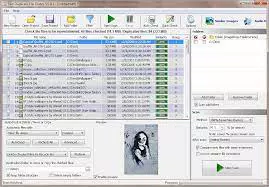
- Built-in Picture Viewer and Music Player – Allows users to preview duplicate media files directly within the app before deciding to delete them, reducing the risk of losing important content.
- System Files and Folders Protection – Automatically safeguards critical system files and directories, preventing unintended deletions that could compromise system stability.
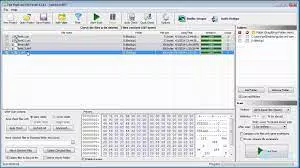
- User-Friendly Interface – Features an intuitive layout that enables users of all experience levels to navigate the app and manage duplicates with minimal learning curve.
- Export Duplicate File List – Offers the ability to export identified duplicates in HTML, CSV, or TXT formats for documentation, sharing, or further analysis.
For example, a photographer managing thousands of images can use the app to detect and remove exact duplicates across multiple folders. Similarly, a music enthusiast can scan their library to find duplicate tracks based on metadata like title, artist, and album. The export feature allows IT administrators to generate reports for compliance or auditing purposes. Each feature is designed to enhance decision-making, ensure safety, and improve workflow efficiency.
Interface, UX & Performance
The app presents a clean, organized interface with clearly labeled sections and logical navigation. Menus are structured to guide users through scanning, reviewing, and managing duplicates in a step-by-step manner. Visual cues and progress indicators enhance usability during lengthy scans.
Although the developer did not list formal performance metrics, the application appears optimized for responsiveness across various device categories. Users can expect stable operation during file analysis and deletion tasks. The interface remains responsive even when processing large file sets, suggesting efficient memory and CPU handling.
Navigation is straightforward, with minimal clicks required to initiate scans or access settings. The built-in media viewer ensures users can verify files without leaving the app, improving confidence in deletion decisions. Stability during extended use was not explicitly confirmed, but the protective measures in place suggest a focus on reliability. Overall, the UX design prioritizes clarity, safety, and ease of use.
Platform Compatibility & Technical Requirements
Duplicate File Finder is available exclusively for the Windows platform. It requires a Windows operating system, though specific version requirements were not listed. The app has a file size of 12.3 MB, indicating a lightweight footprint that should not strain system resources during installation or operation.
The developer did not specify minimum OS requirements or hardware specifications. Compatibility with different Windows versions, such as Windows 10, 11, or earlier editions, remains unclear. Similarly, no information was provided about support for external drives, network locations, or cloud storage integration beyond general mention.
Pros and Cons
Pros
- Accurate content-based duplicate detection reduces false positives
- Built-in media viewer and player enhance user confidence in file decisions
- System files protection ensures safe operation and prevents data loss
- Intuitive interface suitable for non-technical users
- Export functionality supports reporting and data management
Cons
- Platform limited to Windows only
- Specific OS and hardware requirements were not disclosed
- Price point may be high for casual users
- No information on cloud storage integration details
- Updates and support channels were not specified
FAQ
Is Duplicate File Finder safe to use?
The app includes system file protection and allows users to preview files before deletion, minimizing the risk of accidental data loss. However, users should always back up important data before running cleanup operations.
Can I use this app on macOS or Linux?
Based on available information, Duplicate File Finder is currently only available for Windows. No versions for macOS or Linux were listed.
How does the app detect duplicate files?
Duplicate File Finder uses content-based comparison to identify files with identical data. It also considers metadata such as title, artist, and album for music files, ensuring accurate detection.
Can I export the list of duplicates?
Yes, the app allows users to export duplicate file lists in HTML, CSV, or TXT formats for record-keeping or further analysis.
Is the app free to download?
Duplicate File Finder is not free. It is priced at $29.99, which may affect accessibility for some users.
Final Thoughts
Duplicate File Finder stands out as a focused, intelligent tool for users seeking to reclaim storage space and maintain a clean digital workspace. Its combination of accurate detection, safety features, and user-friendly design makes it a valuable asset for anyone managing large file collections. While the price and platform limitation may restrict broader appeal, its reliability and functionality justify the investment for serious users.
Individuals who frequently work with media files, manage large archives, or aim to optimize their system performance will benefit most from this app. The ability to preview content, protect system integrity, and export results adds significant value beyond basic file cleanup.
For those looking to clean up their computer, free up space, and improve file organization, Duplicate File Finder delivers a powerful solution. Its thoughtful design and emphasis on user control reflect a mature approach to utility software.
Download Duplicate File Finder now


